The desk the whole studio runs from.
Sessions, clients, galleries, money, paperwork, and posting: one dashboard behind everything the studio sells. This page walks through it. The demo below is the real thing, with sample data, no login.
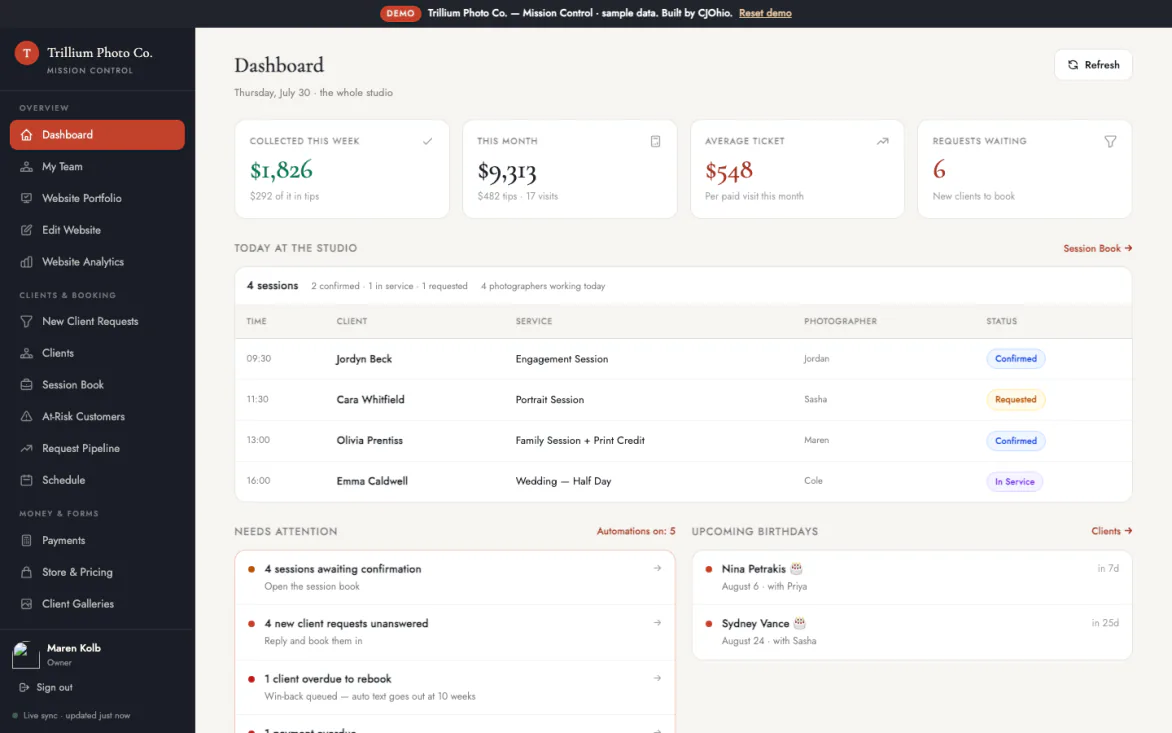
What's on the panel
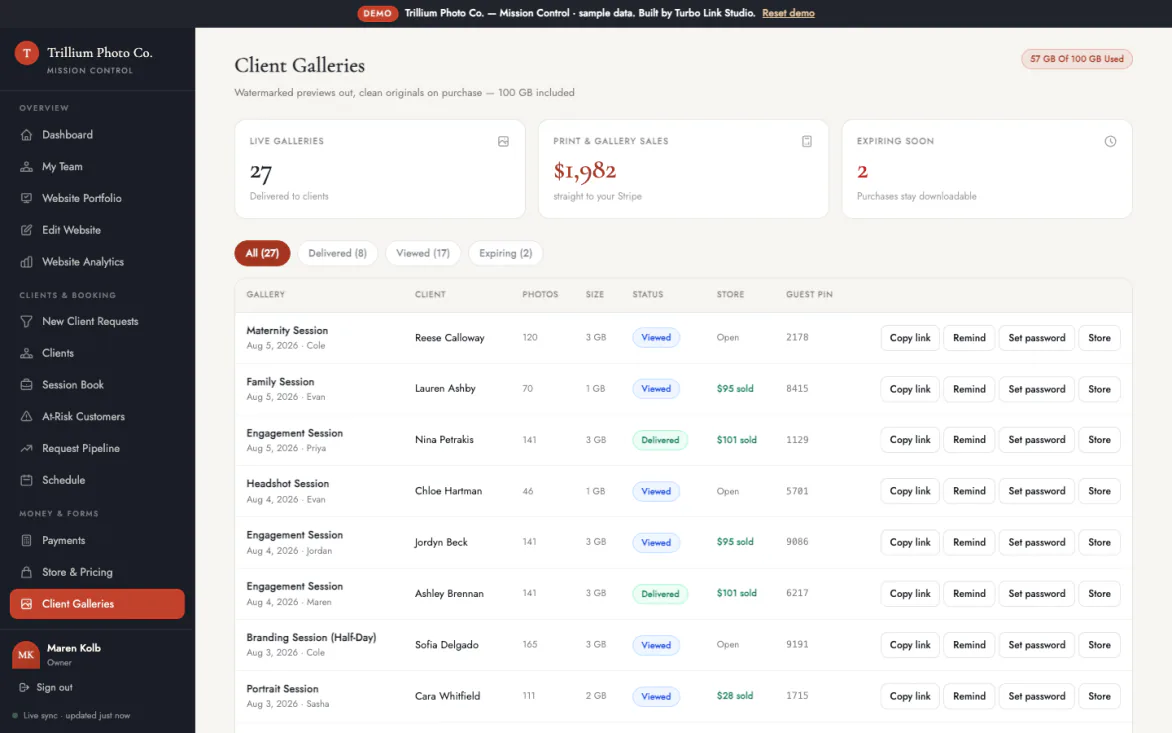
Delivery galleries with the business built in.
Watermarked previews, a password if wanted, a PIN link for family, the store switched on.
- Watermarked until it's paid for. Clients see the work protected, and the clean file unlocks the moment it's bought.
- Password or guest PIN. Lock a gallery behind a password, or hand family a PIN link that needs no account at all.
- Storage you can see. Every view and sale tracks against the 100 GB included, with a meter visible before anything bills.
- Margin in the open. Print orders show the lab's cost next to the studio's price, so the margin is a decision, not a surprise.
- Galleries expire, purchases don't. The link can lapse without taking anything the client already paid for with it.
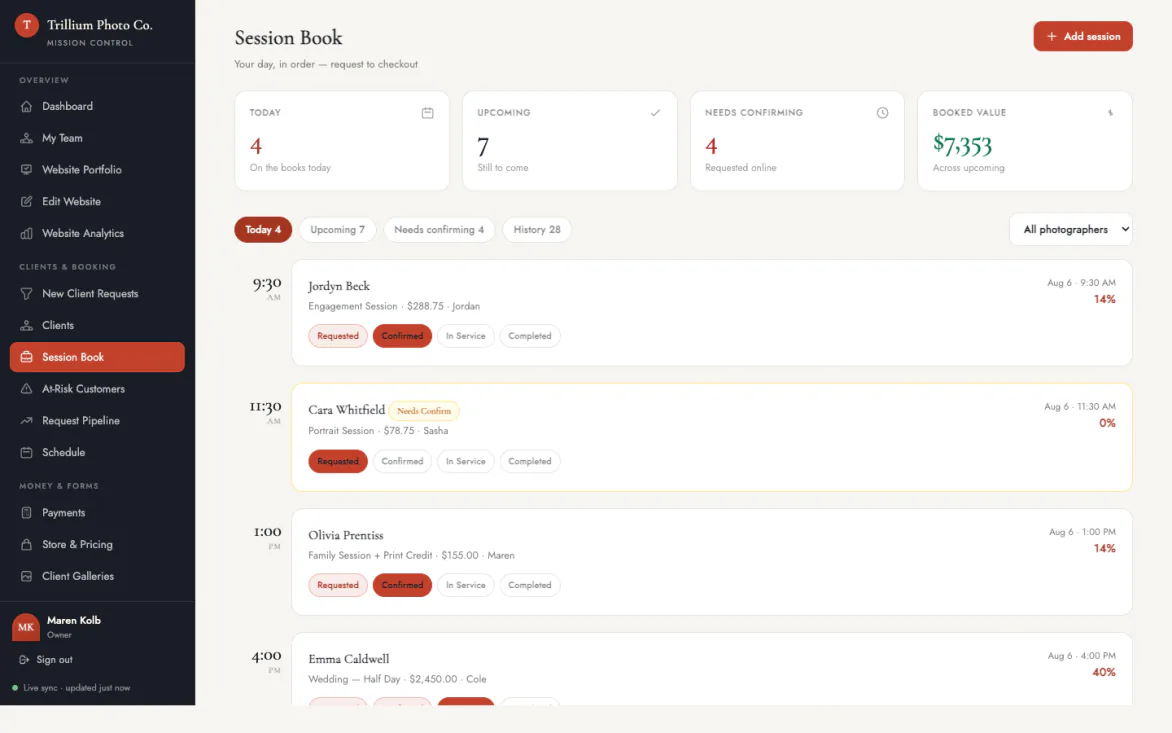
A session book that can't double itself.
Every inquiry from the website lands in the requests inbox with the client's details attached.
- A requests inbox. Website inquiries arrive with the client's details already attached, nothing to re-key.
- Statuses that mean something. Requested, confirmed, in service, completed, and they read the same to everyone on the team.
- It cannot double-book itself. Two sessions can't take the same slot. The database refuses it, rather than a warning nobody reads.
- One calendar, whole studio. Every photographer works from the same book, with buffers between sessions respected.
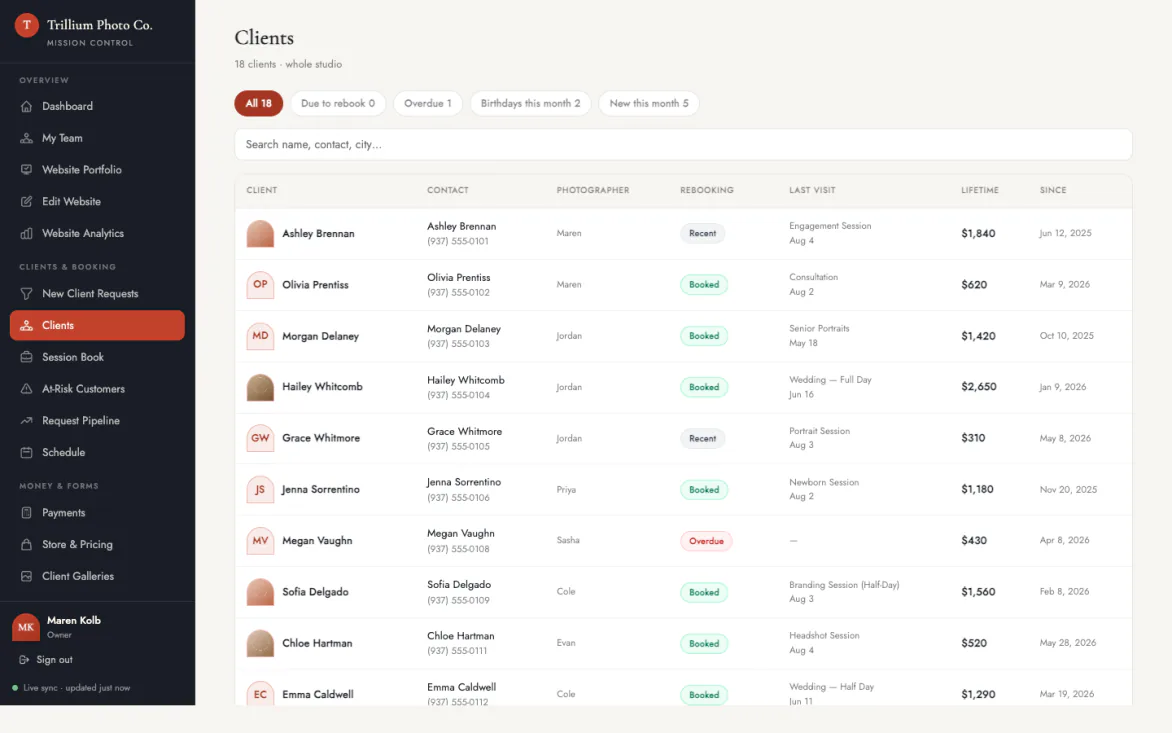
A client book that tells you who to call.
Every client record carries their sessions, payments, signed forms, photos, and notes.
- A real profile per client. Sessions, payments, signed forms, photos, and notes on one record instead of five apps.
- Filters that do the manager's job. Due to rebook, overdue, birthdays this month, new this month, one tap each.
- An inspiration board. Reference shots save to the client's profile instead of scattering across a text thread.
- Last year's notes, still there. You know what you're walking into before the phone starts ringing.
Continues on its own page
The client book is one screen. The CRM is the whole clock.
Who's due at six weeks and overdue at ten, who's quietly drifting, the birthdays and anniversaries that earn a call, and the maybes sitting in a pipeline. The rebooking engine is big enough that folding it in here would bury it.
This is the demo itself, not a promo render.
Two screens, recorded straight from the dashboard open right now.
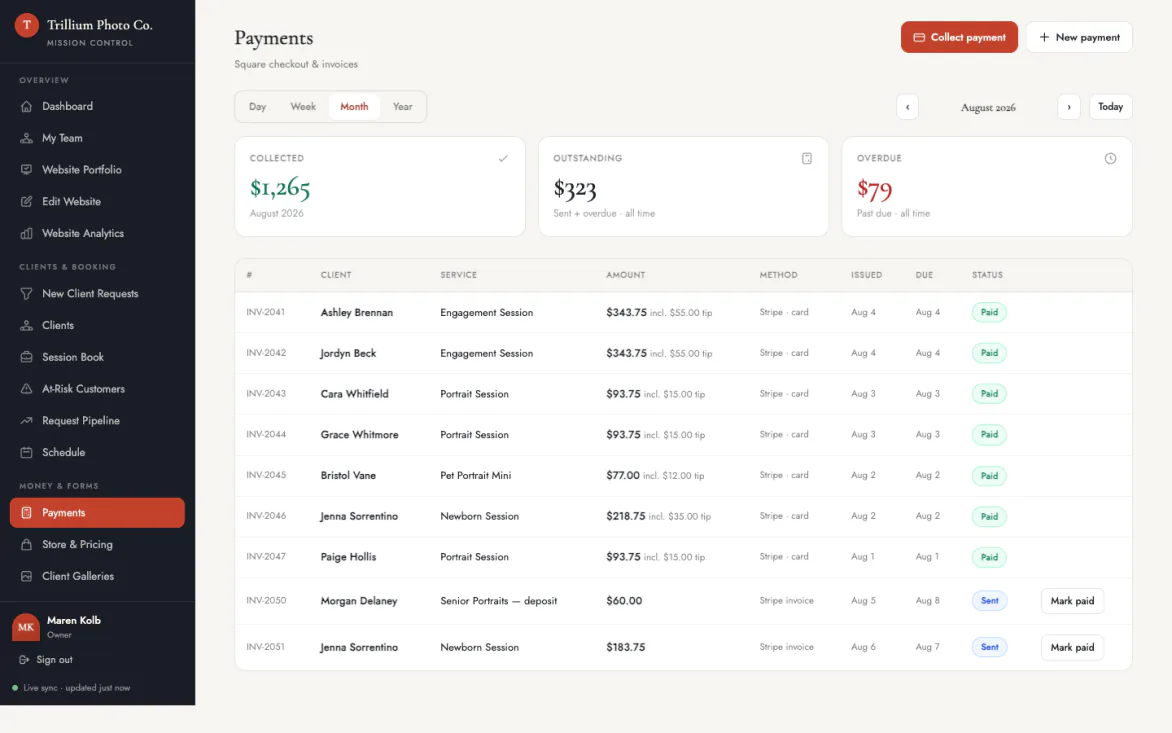
Money that reconciles itself.
Deposits at booking, balances before the shoot, gallery sales after.
- A retainer at booking. Take the deposit when the session is booked, set per service, rather than chasing it later.
- One card rate, anywhere. 2.9% + 15¢ whether it's Tap to Pay in person, a card on file, or a link online.
- Instant payout, only if asked. 1.5% when same-day money is wanted, and nothing extra on the standard schedule.
- Invoices on the record. Every invoice sits on the client with its status in plain sight, not in a separate app.
- Refunds that reconcile. A refund moves the invoice and revokes what it bought, so the books and the gallery agree.
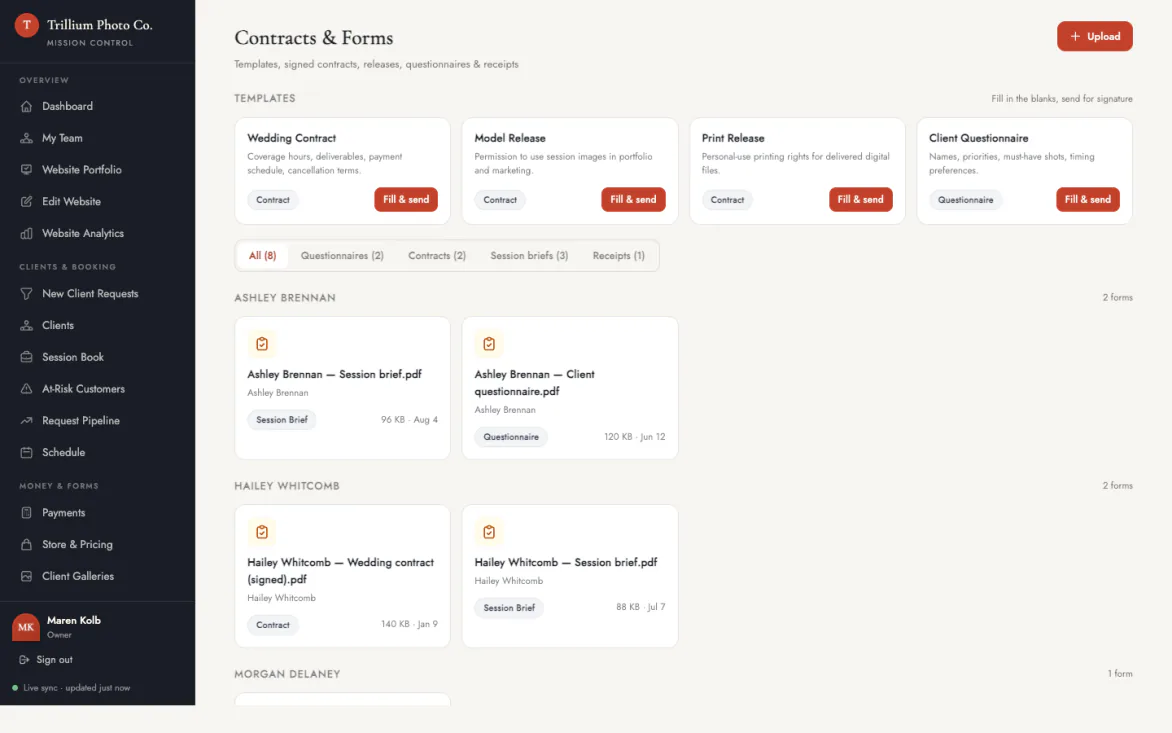
Paperwork that fills itself in.
Four fill-in-the-blank templates: wedding contract, model release, print release, client questionnaire.
- Four templates, ready to send. Wedding contract, model release, print release, and client questionnaire, all editable.
- It fills itself in. Pick the client, session, date, and fee, and the document writes itself from the record.
- Signed from a phone. They sign on the device already in their hand, portal or app. No printer, no scanner needed.
- Signed means frozen. The signed version is captured as it was signed and filed on the client, so it can't drift afterwards.
The whole panel
Everything on the dashboard.
The bays above tell the story. This is the list, so you can check for the one thing you actually came here to find.
Sessions & booking
- Requests inboxWebsite inquiries with the client's details attached.
- Shared calendarDay, week, and month across every photographer.
- Double-booking blockEnforced by the database, not a warning.
- Buffers between sessionsTravel and reset time held automatically.
- Session statusesRequested, confirmed, in service, completed.
- Service menuSession types, durations, prices, deposit percentage.
- Instant bookLet clients confirm without waiting on a reply.
Clients
- Client profilesSessions, payments, forms, photos, and notes in one record.
- Inspiration boardReference shots saved against the client.
- Rebook filtersDue, overdue, at-risk, new this month, birthdays.
- Client messagingA thread per client, no noreply address.
- Notes and historyEverything from last year still on the record.
- Team assignmentWhich photographer owns which client.
Galleries & store
- Delivery galleriesWatermarked previews, clean files once paid.
- Password protectionLock a gallery when it needs locking.
- Guest PIN linksFamily views without making an account.
- Favorites and notesClients mark selects and leave editing requests.
- Download trackingWho downloaded what, and when.
- Print storeSizes, papers, and canvas from a real lab.
- Your pricesSet the studio's price above the lab cost you can see.
- Storage meter100 GB included, visible before anything bills.
- ExpiryLinks lapse; anything bought stays theirs.
Money
- Deposits at bookingA retainer taken when the session is booked.
- InvoicesSent, tracked, and filed on the client record.
- Tap to Pay on iPhoneTake a card with no reader at all.
- Card on fileCharge a saved card for the balance.
- Payment linksSend one mid-shoot from a phone.
- Instant payout1.5% when the money is wanted the same day.
- Refund reconciliationRefunds move the invoice and revoke access.
- ReportingCollected this week, this month, average ticket.
Paperwork
- Contract templatesWedding, model release, print release, questionnaire.
- Auto-fillClient, session, date, and fee pulled from the record.
- E-signatureSigned from a phone, no printer involved.
- Tamper-evident copiesThe signed version is frozen as signed.
- Filed on the clientEvery signed document on the record it belongs to.
Website & marketing
- Portfolio managerDrag, drop, reorder, publish.
- Edit websiteCopy, sections, and images without a webmaster.
- Template switchingChange the look without touching the content.
- Announcement barSay "fall minis are open" across the whole site in one edit.
- Social StudioCaptions drafted from the work and scheduled out.
Fair questions, straight answers.
The details before you have to ask.
Is the demo the real product?
It's the real dashboard with a fictional studio's sample data, Trillium Photo Co., so every screen can be clicked without signing up. The studio gets the same dashboard with its own name on it.
I shoot alone. Is this overkill?
The dashboard runs a book of one just fine; the roster features simply don't get in the way. A solo studio is the $49 Studio plan. Team only matters once a second shooter joins the books.
What does it cost?
$49 a month billed annually, or $55 month-to-month, for the website, booking, this dashboard, and delivery galleries with 100 GB included. The full list lives on the photographers overview.
Where does my data live if I leave?
The client list, galleries, and records stay owned by the studio. Export them and go, no hostage clause, and purchased photos stay downloadable for clients.
Start with the demo.
Studio, per month, billed annually
The gallery it shot markets the studio.
Social Studio drafts captions from the work, in the studio's voice, and schedules them across connected networks.